
In This Article
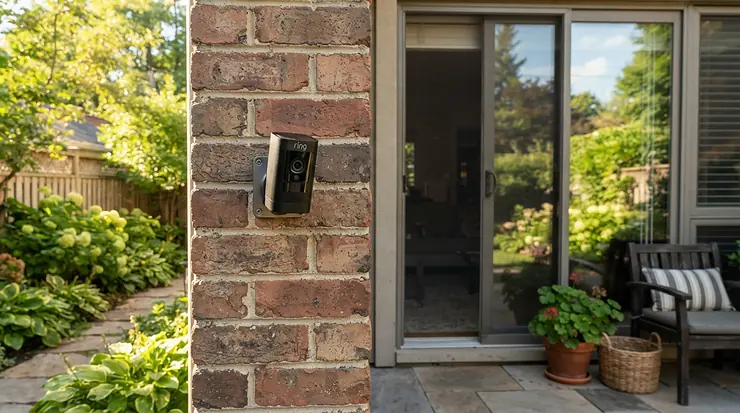
Your landlord loves your security deposit almost as much as you do. That’s the whole problem. Porch pirates don’t care about your lease, but your lease cares a great deal about screw holes. One enthusiastic drill bit can turn a refundable deposit into a very expensive lesson. The good news is that a battery outdoor security camera for renters no drilling is now a real product category, not a compromise.

Here’s what changed. Modern wire-free cameras run for months on a charge, snap onto magnets or stick to plates, and come off the wall in about two minutes on moving day. PCWorld’s review of TP-Link’s magnetic camera pointed out that it can be installed without modifying the home, which is exactly the renter use case. The same review warned that a camera that comes off easily for you could come off easily for a thief too. That tension runs through this whole guide.
So what do you get here? Seven real cameras across budget, mid-range, and premium tiers, with every spec translated into plain English. We’ll look at how a no drill battery camera for apartment balcony setups actually works, and where a magnetic mount outdoor camera for rental homes shines or flops. We’ll cover why a removable rechargeable battery earns its keep, how to use an adhesive mounting plate without peeling paint, and what battery life in high traffic areas really looks like. It’s all spec analysis, aggregated reviewer sentiment, and practical decisions. Prices are ranges only, so check current price before you buy.
Quick Comparison: Battery Outdoor Security Camera for Renters No Drilling Options
| Camera | No-Drill Route | Power | Best For |
|---|---|---|---|
| Tapo C425 MagCam | Magnetic base, plus a supplied metal plate for non-steel surfaces | Built-in 10,000 mAh | Best overall renter value |
| Blink Outdoor 4 | Third-party adhesive or tabletop mount | AA lithium cells | Lowest-maintenance budget pick |
| Ring Stick Up Cam Pro Battery | Ledge placement or third-party adhesive mount | Quick-release rechargeable pack | Households already on Ring |
| Wyze Battery Cam Pro | Standard 1/4″-20 thread (tripods, clamps, adhesive-plate mounts) | Removable 6,200 mAh pack | Swap-and-go batteries |
| eufy SoloCam S340 | Third-party clamp or adhesive mount, plus included solar panel | Built-in battery plus solar | Sunny balconies and wide coverage |
| Reolink Argus 4 Pro | Included strap for railings and posts | Built-in 5,000 mAh plus optional solar | Sharpest, widest picture |
| Arlo Essential XL 2K | Third-party adhesive option (included plate is screw-based) | Oversized built-in battery | Rarely recharging |
Looking at the table, the Tapo C425 MagCam is the only camera here whose renter-friendly mounting is the headline feature rather than an afterthought. The Wyze Battery Cam Pro wins on battery flexibility, while the Reolink Argus 4 Pro wins on picture. Notice how many cameras need a third-party mount: “wire-free” and “no-drill” are not the same promise.
💬 Just one click — help others make better buying decisions too!😊
Top 7 Battery Outdoor Security Cameras for Renters No Drilling: Expert Analysis
Every pick below pairs real specs with what they mean in daily use, plus aggregated reviewer sentiment from published reviews and retailer listings. Nothing here is hands-on testing, and no review quotes are invented.
1. Tapo C425 MagCam — magnet base makes re-aiming a one-hand job
The magnet is the whole story: snap the camera on, twist it to a new angle, pull it off to charge. No tools once the base is up. On paper you get 2K QHD video, a 142° field of view, IP66 weather sealing, and a 10,000 mAh battery. TP-Link rates that battery at up to 300 days, but only at about 230 seconds of daily use. Its own listing says 360 seconds a day drops the figure to roughly 180 days, so a busy doorway shortens the runway fast.
Based on the spec comparison, this is the best fit for the renter brief. The listings mention a supplied metal plate with screws or 3M adhesive, so a non-steel wall can still work without a drill. Footage can live on a microSD card up to 512 GB, with cloud storage optional.
Reviewers consistently credit the install experience, and the model has collected Wirecutter and PCMag recognition. Two caveats recur. Some owners report inconsistent battery life, and PCWorld flagged theft exposure.
Pros:
- ✅ Magnetic base for tool-free repositioning
- ✅ Local microSD storage, no required subscription
- ✅ Wide 142° view with 2K clarity
Cons:
- ❌ Magnet that’s easy to remove is easy to steal
- ❌ Battery claims depend heavily on usage
Price: around the $70–$120 range. For renters, that’s the strongest value on this list.

2. Blink Outdoor 4 — AA batteries rated for up to two years
Blink’s pitch is laziness, in the best sense. You get 1080p video, a 143° diagonal view, and AA lithium cells that Blink rates for up to two years. A Battery Extension Pack stretches that claim toward four. The catch: AA lithium cells are replaceable but not rechargeable, so this camera doesn’t offer a removable rechargeable battery.
It also needs the Sync Module, which plugs in indoors. For a balcony, that means your Wi-Fi path matters more than usual. TechRadar’s review calls it beginner-friendly with a simple app and long battery life, and that framing fits first-time renters well.
Reviewers do hedge on the headline number. One aggregated review summary says the two-year claim couldn’t be verified within testing periods, and another outlet called the figure untestable for now. Treat two years as a manufacturer ceiling, not a promise.
Pros:
- ✅ Replaceable AA cells, no charging routine
- ✅ Quick, beginner-friendly setup
- ✅ Budget-friendly entry price
Cons:
- ❌ Needs a Sync Module plugged in indoors
- ❌ 1080p trails the 2K–4K competition
Price: around the $100–$120 range for a single-camera kit. It’s good value if you hate recharging.
3. Ring Stick Up Cam Pro Battery — radar-assisted motion alerts, Ring ecosystem
The standout here is smarter motion sensing. Ring pairs 1080p HDR video and color night vision with radar sensors, which one reviewer says improve detection accuracy. The quick-release battery pack is rechargeable, and a USB-C port accepts compatible Ring solar panels. In practice, that means fewer “false alarm: a leaf” notifications.
The box ships with screws and wall anchors, so a renter needs a different plan. Use a ledge, a clamp, or a third-party adhesive mount. Saved video requires a Ring Protect plan after the free trial, so budget for that.
Sentiment is solid but not glowing. One retailer listing shows a 4.2 rating from 33 reviews, with 76% recommending it. A SafeWise review of the Stick Up Cam family notes that frequent motion events, live views, and longer clips drain the battery faster.
Pros:
- ✅ Radar-assisted motion detection
- ✅ Quick-release rechargeable battery pack
- ✅ Deep integration with other Ring devices
Cons:
- ❌ Saved clips need a paid plan
- ❌ Included mounting hardware means drilling
Price: around the $90–$180 range, with frequent promotions. It’s worth it only if Ring is already your system.
4. Wyze Battery Cam Pro — swappable 6,200 mAh battery packs
If one feature defines “removable rechargeable battery” in this price bracket, it’s this camera. You get a 2.5K HDR image, a 134° view, IP65 sealing, radar plus PIR motion sensing, a spotlight, and a siren. There’s no hub, and it handles both 2.4 GHz and 5 GHz Wi-Fi. At 0.94 lb, it’s also a heavy camera for an adhesive plate to hold.
The mounting is a standard 1/4″-20 thread, which opens up tripods, clamps, and third-party plates. The universal mount in the box has no magnet, and forum owners have resorted to epoxying one on.
Tom’s Guide found the video clear enough to identify people but griped about frame rate. A long-term write-up noted the original battery eventually wore out, yet replacing the pack was straightforward. That’s the removable-pack argument in one sentence.
Pros:
- ✅ User-swappable rechargeable battery packs
- ✅ Standard 1/4″-20 mounting thread
- ✅ Radar plus PIR for smarter alerts
Cons:
- ❌ No magnet in the included mount
- ❌ Frame rate disappoints some reviewers
Price: around the $70–$100 range. That’s strong value, especially with a spare pack.
5. eufy SoloCam S340 — dual lenses, 360° pan, solar top-ups
One camera, two lenses: a wide view plus a zoom lens for detail up to 50 feet. Specs include 3K resolution, 8× hybrid zoom, 360° horizontal and 70° vertical pan, a 135° field of view, and a built-in 8 GB eMMC for local storage. eufy rates the battery at about three months standalone, with a removable 2.2W solar panel for continuous top-ups. It’s rated from -4°F to 122°F.
For a sunny balcony, solar is a gift. The battery itself is built-in and non-removable, and eufy says battery cameras can’t record 24/7. A panning camera can sweep a whole balcony and the street below, so set privacy zones rather than auto-tracking your neighbors.
A Parkers review called it fuss-free, praised the lack of subscriptions, and found image quality reasonable. The reviewer also wished it were a stick-up design, which hints at the mounting question renters will face.
Pros:
- ✅ Dual-lens detail with 8× hybrid zoom
- ✅ No monthly fee, built-in 8 GB storage
- ✅ Removable solar panel for continuous power
Cons:
- ❌ Non-removable internal battery
- ❌ Solar helps only where there’s real sunlight
Price: around the $200–$220 range. It’s premium, but it covers the most ground.

6. Reolink Argus 4 Pro — 4K, 180° view, strap in the box
This is the picture-quality champion. Specs: 8 MP (5120×1440) dual-lens video, 180° horizontal by 50° vertical coverage, Wi-Fi 6, IP66 sealing, a 5,000 mAh battery, and microSD up to 128 GB. Reolink says smart detection comes without subscription fees. Its ColorX night vision avoids burning battery on LED spotlights.
For renters, the strap is the quiet hero, because it wraps around railings and posts with no drill in sight. But a German reviewer reported the battery lasted just under a month even on a not-very-busy street, and Reolink itself recommends the optional 6W solar panel. NextPit’s verdict leaned “average” for the solar-powered experience.
Pros:
- ✅ Sharp 4K dual-lens image
- ✅ 180° field of view covers a whole balcony
- ✅ No-subscription local storage
Cons:
- ❌ Battery life drops quickly in busy spots
- ❌ Solar panel adds to the real cost
Price: around the $150–$200 range before the solar panel. Buy it for the picture and plan for solar.
7. Arlo Essential XL 2K — longest runway between charges
The XL’s whole identity is its oversized battery. One review site rates the third-generation XL at 16 to 24 months of typical use, while Arlo’s standard Essential is rated closer to four months. You also get 2K video, color night vision, a spotlight, a siren, and dual-band Wi-Fi. Tom’s Guide praised the image and battery life but said core features sit behind a monthly subscription.
The mount is the sticking point for renters. The included plate takes screws, reviewers call the mount restrictive with little angle adjustment, and there’s no tripod thread. The battery isn’t removable, so the whole camera comes down to charge. One report mentioned water ingress.
Pros:
- ✅ Extremely long battery runway
- ✅ Sharp 2K video with color night vision
- ✅ Spotlight and siren onboard
Cons:
- ❌ Subscription-dependent features
- ❌ Restrictive, screw-based mounting
Price: around the $90–$150 range depending on generation and bundle. It makes sense only if the subscription doesn’t bother you.
Top 7 at a Glance: Specs and Price Ranges
| Camera | Video | Battery Claim | Storage | Hub? | Price Range | Best For |
|---|---|---|---|---|---|---|
| Tapo C425 MagCam | 2K QHD | Up to 300 days (230 s/day lab figure) | microSD to 512 GB; optional cloud | No | $70–$120 | Overall renter value |
| Blink Outdoor 4 | 1080p | Up to 2 years (AA lithium) | Check bundle | Yes (Sync Module) | $100–$120 | Lowest maintenance |
| Ring Stick Up Cam Pro Battery | 1080p HDR | Rechargeable pack; varies with use | Ring Protect plan | No | $90–$180 | Ring households |
| Wyze Battery Cam Pro | 2.5K HDR | Swappable 6,200 mAh pack | microSD and cloud | No | $70–$100 | Swap-and-go batteries |
| eufy SoloCam S340 | 3K | About 3 months, solar extends | 8 GB built-in | No | $200–$220 | Sunny balconies |
| Reolink Argus 4 Pro | 4K (5120×1440) | 5,000 mAh; shorter on busy streets | microSD to 128 GB | No | $150–$200 | Sharpest picture |
| Arlo Essential XL 2K | 2K | 16–24 months rated (3rd-gen XL, per review site) | Cloud, subscription-led | No | $90–$150 | Rarely recharging |
Read the table sideways and a pattern appears. Cameras with local storage (Tapo C425 MagCam, eufy SoloCam S340, Reolink Argus 4 Pro) trade monthly fees for a bigger upfront check. The Wyze Battery Cam Pro is the only one that combines a user-swappable pack with a sub-$100 price range, which makes it the practical pick for budget buyers who hate downtime.
✨ Don’t Miss These Renter-Friendly Picks!
🔍 Ready to protect your door, balcony, and deposit at the same time? Click on any highlighted camera name to check current pricing and availability. Prices change often, so what you see today may differ from this guide. These cameras will help you build a setup that’s easy to install, easy to remove, and kind to your lease. 🏠
What Is a Battery Outdoor Security Camera for Renters No Drilling?
A battery outdoor security camera for renters no drilling is a weather-resistant, wire-free camera that runs on a rechargeable or replaceable battery and mounts with magnets, adhesive, straps, clamps, or a tabletop stand instead of screws. It records motion events over Wi-Fi, so you can install and remove it without touching your walls or your deposit.
Three things make the category work. Battery power removes the electrician. Wi-Fi removes the cable run. A non-invasive mount removes the hole. Take any one away and the “renter-friendly” label falls apart, which is why a camera that needs screws or an outlet doesn’t qualify.
Where This Category Falls Short
Battery cameras record motion clips rather than continuous footage, and eufy states plainly that its battery cameras can’t do 24/7 recording. They also depend on your Wi-Fi reaching the mounting spot. Neither is a dealbreaker, but go in knowing it.
How to Choose a Battery Outdoor Security Camera for Renters No Drilling
- Start with the surface. Steel doors and steel railings welcome magnets. Vinyl, brick, aluminum, and glass need a plate, strap, or clamp.
- Pick your battery philosophy. Built-in packs are simple, removable packs minimize downtime, and AA cells never need a charger.
- Check storage before the price tag. Local microSD means no monthly fees, while cloud-led systems add a recurring line to your budget.
- Weigh field of view against resolution. A 180° lens that sees your whole balcony beats extra pixels aimed at a wall.
- Verify weather ratings. Look for IP65 or IP66 sealing and a temperature range that covers your winters.
- Study the motion sensing. Radar plus PIR (Wyze, Ring) cuts false alerts better than PIR alone, and activity zones keep sidewalks out of your battery budget.
- Plan for moving day. Count how many parts (plates, adhesives, solar panels) you’ll need to peel off and pack.
No Drill Battery Camera for Apartment Balcony: Placement That Works
Balconies are tricky. They’re exposed, windy, shared with a neighbor’s line of sight, and often made of the one material magnets ignore. Start by testing the railing with a fridge magnet. Steel grabs it. Aluminum shrugs.
If the railing is steel, a magnetic base like the Tapo C425 MagCam is nearly effortless. If it isn’t, wrap the strap included with the Reolink Argus 4 Pro around a post, or screw a 1/4″-20 clamp mount to nothing at all by clamping it to the Wyze Battery Cam Pro‘s standard thread. A flat ledge or planter stand works for tabletop-style designs like the Ring Stick Up Cam Pro Battery.
Placing a camera inside a glass slider and aiming out is another no-drill trick. The catch is that infrared night vision and spotlights bounce off glass, so turn them off or expect glare. A balcony with afternoon sun also suits the eufy SoloCam S340‘s solar panel.
Two safety notes. Never clamp a camera where it could fall onto someone below. And aim at your own space, not your neighbor’s balcony, because privacy complaints end more camera setups than thieves do.
Magnetic Mount Outdoor Camera for Rental Homes: Where It Shines and Where It Doesn’t
A magnetic mount outdoor camera for rental homes is the closest thing to a free lunch in this category. It works instantly, repositions in seconds, and leaves nothing behind. The limits are physical. Magnets grab ferrous metal: steel door frames, steel railings, metal mailbox posts. Wood, vinyl siding, brick, and most aluminum just ignore them.
The fix is a plate. The Tapo C425 MagCam ships with a metal plate for non-steel surfaces, and you can attach it with screws or adhesive. Adhesive keeps you inside the no-drill rule, but check how your lease treats adhesive residue.
Then there’s theft. As PCWorld pointed out, the same magnet that lets you reposition quickly lets a stranger walk off with the camera. Mount it above arm’s reach, use motion clips that upload or save locally before anyone can grab it, and consider a tether anchored with adhesive. A magnet also holds firmly against painted steel, so a thin felt pad prevents scuffs if your landlord inspects the door.
Removable Rechargeable Battery: Why Swappable Packs Matter
A removable rechargeable battery solves a problem most buyers don’t think about until month fourteen: downtime. When a pack runs low, you swap in a charged one, and the camera barely blinks. The Wyze Battery Cam Pro‘s 6,200 mAh pack and the Ring Stick Up Cam Pro Battery‘s quick-release pack both work this way.
Compare that with the other designs. The Blink Outdoor 4 uses replaceable AA lithium cells, which are easy to swap but not rechargeable. The Tapo C425 MagCam, eufy SoloCam S340, and Arlo Essential XL 2K use built-in batteries, so the camera itself comes down for charging, which is slower and leaves a coverage gap.
Lithium-ion wears out. A long-term Wyze write-up described the original battery fading over the years, with replacement being the easy fix. A swappable pack extends the camera’s life and moves with you to your next rental.
The tradeoff is cost: a spare pack (or a dock) adds to the bill. And if the camera sits two stories up, a long-life built-in battery beats a pack you have to climb a ladder to swap.
Adhesive Mounting Plate: How to Install and Remove It Without Damage
An adhesive mounting plate is how you give a non-magnetic wall a magnet-friendly or screw-free mount. Done right, it holds for months. Done wrong, it lands at 2 a.m. on your doormat.
- Choose the surface. Smooth, non-porous, clean surfaces work. Brick, stucco, and flaking paint don’t.
- Clean it. Wipe with isopropyl alcohol and let it dry completely.
- Check the weight rating. The Wyze Battery Cam Pro weighs about 0.94 lb, so confirm the plate is rated well above that.
- Press and wait. Adhesive makers generally advise firm pressure and a cure time before loading, often 24 hours.
- Mind the weather. Freeze-thaw cycles and summer sun can loosen adhesive, so check the plate monthly for the first season.
- Remove slowly. Warm the plate gently and slide dental floss behind it, rather than yanking straight out.
Common mistakes: mounting on textured surfaces, skipping the alcohol wipe, and trusting a plate rated for a light doorbell with a heavy camera. When in doubt, ask your landlord before touching painted surfaces.
Battery Life in High Traffic Areas: What to Expect
Battery claims are written for quiet cul-de-sacs. A camera watching a busy sidewalk, a stairwell, or a street-facing balcony wakes up constantly, and every wake-up costs power.
TP-Link’s own numbers show the effect clearly. The Tapo C425 MagCam is rated for up to 300 days at about 230 seconds of daily use and about 180 days at 360 seconds. That’s roughly 57% more activity for 40% less battery life. One reviewer reported the Reolink Argus 4 Pro‘s battery lasted just under a month on a not-very-busy street, which is why Reolink pushes its solar panel. The Blink Outdoor 4‘s two-year claim is a manufacturer figure that reviewers couldn’t verify in their testing windows.
Cold weather adds a second variable. Battery University explains that lithium-ion packs generally shouldn’t be charged below freezing, even though they can discharge in much colder conditions. So in winter, bring the pack or camera indoors to charge.
Ways to Stretch Battery Life
- Draw activity zones that exclude sidewalks, roads, and swaying trees.
- Lower motion sensitivity and add a cooldown between recordings.
- Use shorter clips and skip unnecessary live views.
- Add solar where the sun cooperates (eufy SoloCam S340, Reolink Argus 4 Pro).

Real-World Scenarios: Three Renters, Three Setups
The third-floor apartment. A steel balcony door, a small budget, and a once-a-week glance at the app. The Tapo C425 MagCam snaps onto the steel frame in minutes, runs on a microSD card, and costs less than a typical year of cloud storage on some systems. Slide it off for charging twice a year or so.
The street-facing townhouse. Vinyl siding, a busy sidewalk, and constant motion triggers. The Wyze Battery Cam Pro on an adhesive-plate mount with a spare battery pack means you swap packs instead of living with dead-camera gaps. Tight motion zones matter more here than raw resolution.
The mountain-town deck. Cold winters, a sunny deck, and a tenant who’d rather not climb anything in January. The eufy SoloCam S340 is rated from -4°F to 122°F, and its solar panel keeps the battery topped when sunlight allows. Its pan range covers the deck and the driveway in one view.
For frequent movers, the Wyze Battery Cam Pro‘s standard thread and swappable pack travel best, because a tripod mount fits almost any next apartment.
Common Problems and Fixes
Problem: the camera sags or slides. Likely cause: weak adhesive or a too-heavy camera. Fix: use a plate rated above the weight, clean the surface first, and re-check after the first week.
Problem: constant false alerts. Likely cause: motion zones covering a street or a tree. Fix: redraw zones, lower sensitivity, and consider radar-plus-PIR designs like the Wyze Battery Cam Pro or Ring Stick Up Cam Pro Battery.
Problem: Wi-Fi drops at the balcony. Fix: move the router or add a mesh node. Note that the Tapo C425 MagCam uses 2.4 GHz only, while the Reolink Argus 4 Pro supports Wi-Fi 6.
Problem: glare at night through glass. Fix: turn off the spotlight and infrared, or mount outside.
Problem: battery drains faster than promised. Fix: shorten clips, tighten zones, and add solar. If the camera records constantly regardless, the placement is wrong, not the battery.
Battery Outdoor Cameras vs Traditional Alternatives
| Option | Drilling? | Power Upkeep | Landlord-Friendly? | Best For |
|---|---|---|---|---|
| Battery camera with magnet, adhesive, or strap | No | Recharge or swap occasionally | Usually, with permission | Renters, movers |
| Wired or PoE camera | Yes | None once installed | Rarely | Owners |
| Plug-in camera with extension cord | Sometimes | Needs a nearby outlet | Cord routing can be an issue | Porches with outlets |
| Interior window camera facing out | No | Plug-in or battery | Often easiest | Glass-door views |
The table makes the tradeoff plain: battery cameras give up “install it and forget it” in exchange for “install it and take it with you.” Wired cameras offer the best reliability, but they’re a poor fit when the walls aren’t yours. An interior window camera is the stealth option, though glare and limited view angles are real compromises. For most renters, a battery camera such as the Tapo C425 MagCam or Wyze Battery Cam Pro hits the best balance of coverage and reversibility.
Long-Term Cost and Subscription Math
Sticker price lies. Three-year cost is hardware plus subscriptions plus battery replacements, and the middle term is where budgets quietly bleed.
Local-storage cameras (Tapo C425 MagCam, eufy SoloCam S340, Reolink Argus 4 Pro) keep recurring costs near zero, since a microSD card does the job. Cloud-led systems add a plan: Ring saves videos with a Ring Protect plan after a free trial, and Arlo’s core features lean on a subscription. As an illustration only, a hypothetical $4 monthly plan adds $144 over three years, which can exceed the price difference between a budget camera and a premium one.
Battery costs vary too. Blink Outdoor 4 owners buy AA lithium cells now and then, and Wyze Battery Cam Pro owners may buy a spare pack. Solar panels add to the up-front bill but can cut maintenance trips.
The value ranking, based on specs and fees: Tapo C425 MagCam first for pure renter economics, Wyze Battery Cam Pro second for flexibility, and the subscription-heavy options last unless the ecosystem matters to you.
Privacy, Lease Rules, and Safety Guide
This isn’t legal advice, and I’m not a lawyer, but a few basics apply almost everywhere. Read your lease and get written permission before mounting anything on exterior or shared areas, since many landlords reserve control over them. Aim at your own door or balcony, not at neighbors’ windows. And check local rules before recording audio, because some states restrict it. Many cameras let you turn audio off.
Account security matters too. The FTC’s consumer alert on Ring’s privacy failures urges camera owners to review their app’s privacy settings and permissions. Use a unique password, turn on two-factor authentication, and remove shared access you no longer need.
On battery safety, charge lithium packs indoors on a non-flammable surface and don’t leave them unattended. And since Battery University advises against charging lithium-ion below freezing, warm the camera or pack to room temperature before plugging in.

FAQ
❓ Can a battery outdoor security camera be mounted without drilling on brick or vinyl siding?
❓ How long does a battery outdoor camera last in freezing weather?
❓ Do battery outdoor cameras for renters need a subscription?
❓ Is a magnetic camera mount safe from theft?
❓ Can a removable battery camera work with solar power on a sunny balcony?
Conclusion: Pick the Camera That Packs Up Easily
The best battery outdoor security camera for renters no drilling is the one that matches your surface, your sunlight, and your patience. For most tenants, the Tapo C425 MagCam is the strongest all-rounder: magnetic, local storage, and a low price range. If battery swaps matter, the Wyze Battery Cam Pro earns its spot. If you want zero charging chores, look at the Blink Outdoor 4. If the picture is the priority, the Reolink Argus 4 Pro delivers, ideally with a solar panel. And if your balcony gets real sunshine, the eufy SoloCam S340 is built for it.
Before you buy, do three things. Check your lease. Test your surface with a magnet. And size your battery expectations to your foot traffic, not the box claim. Do that, and moving day becomes a two-minute job with a clean deposit receipt.
Recommended for You
- Outdoor Camera Mounting Accessories for Gutters and Eaves: Top 7 2026
- Color Night Vision Outdoor Camera for Dark Rural Property 7 Best 2026
- Weatherproof Outdoor Camera for Extreme Cold Climates: 7 Best (2026)
Disclaimer: This article contains affiliate links. As an Amazon Associate, I earn from qualifying purchases. If you purchase products through these links, we may earn a small commission at no additional cost to you.
✨ Found this helpful? Share it with your friends! 💬🤗
